


Many people pick a router based solely on the glossy box art or a high theoretical speed rating on the label. They soon discover that proprietary firmware limits their control over privacy and security.
Switching to custom software like OpenWrt changes the math entirely. You deserve a device that actually belongs to you. Here are the Best Routers for Openwrt to help you reclaim your network.
Key Takeaways
- Prioritize a router with a MediaTek or Qualcomm chipset that features official mainline support to ensure your firmware remains updated and stable.
- Check the RAM capacity carefully because running modern filtering tools like AdGuard Home requires at least 512MB to avoid system sluggishness.
- Confirm that your chosen hardware has multi-gigabit Ethernet ports if you want to take full advantage of high-speed fiber internet plans.
- Consider whether you need a dedicated travel size or a high-performance desktop unit, as the power requirements and cooling capabilities differ significantly.
- Ensure the hardware offers hardware encryption acceleration for WireGuard VPN, otherwise your connection speeds will drop during heavy encrypted traffic.
| Ultimate Performance Powerhouse |  |
GL.iNet Flint 2 Wi-Fi 6 | Dual 2.5G ports | Stable OpenWrt firmware | Fast Wi-Fi 6 speeds | View on Amazon | Read Review |
| Best Travel Companion |  |
GL.iNet Beryl AX Wi-Fi 6 | Extremely portable size | Fast 2.5G WAN port | Reliable VPN routing | View on Amazon | Read Review |
| Developer Dream Hardware |  |
youyeetoo Banana Pi OpenWrt Router | Official OpenWrt support | Powerful MediaTek SoC | High performance RAM | View on Amazon | Read Review |
| Next-Gen Mobile Networking | 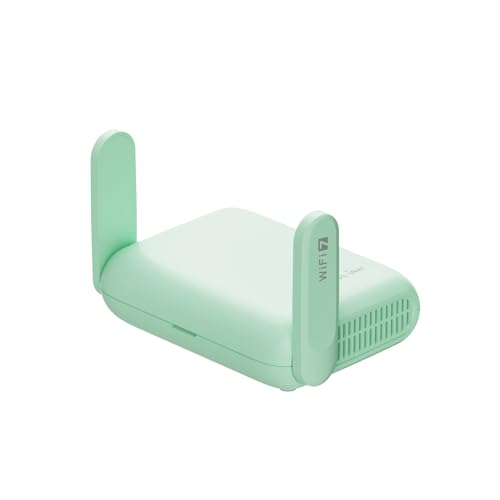 |
GL.iNet Beryl 7 Wi-Fi Router | Cutting edge Wi-Fi 7 | Dual 2.5G ports | High speed WireGuard | View on Amazon | Read Review |
| Affordable Connectivity Essential |  |
GL.iNet Opal Travel Router | Very lightweight build | Extensive VPN compatibility | Simple OpenWrt interface | View on Amazon | Read Review |
| High Bandwidth Masterpiece |  |
GL.iNet Flint 3 Wi-Fi 7 | Tri-band Wi-Fi 7 | Five 2.5G ports | Extremely low latency | View on Amazon | Read Review |
| Balanced Home Reliable | 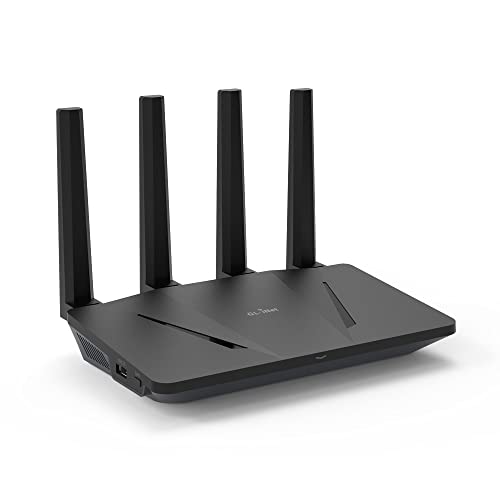 |
GL.iNet Flint Wi-Fi 6 Router | Supports 120 devices | Five gigabit ports | Easy to setup | View on Amazon | Read Review |
| Efficient Gaming Specialist |  |
GL.iNet Flint 3e Wi-Fi 7 | Fast Wi-Fi 7 speeds | Advanced MLO technology | Optimized for gaming | View on Amazon | Read Review |
| Professional Network Controller |  |
TP-Link ER605 Gigabit VPN | Multi-WAN load balancing | Omada SDN integration | High security firewall | View on Amazon | Read Review |
| Accessible High-Speed Upgrade | Netgear Nighthawk Wi-Fi 7 | Wide signal coverage | High speed 2.5G port | Simplified user setup | View on Amazon | Read Review |
More Details on Our Top Picks
-
GL.iNet Flint 2 Wi-Fi 6
If you want to squeeze every drop of bandwidth from your connection, this is the machine for you. It handles multi-gigabit speeds across its dual 2.5G ports, making it a dream for anyone running a home server or a serious gaming rig.
The pre-installed OpenWrt firmware offers a stable foundation for custom configurations without the usual headache of manual flashing. Just be aware that its larger footprint might require a dedicated shelf rather than hiding it behind a desk.
- Brand:GL.iNet
- Device Type:Wireless Router
- Wi-Fi Standard:Wi-Fi 6
- Port Speed:2.5G
- Wireless Speed:6 Gbps
- Additional Feature:OpenVPN and WireGuard support
- Additional Feature:Pre-installed OpenWrt software
- Additional Feature:8-stream Wi-Fi 6
-
GL.iNet Beryl AX Wi-Fi 6
Frequent flyers and digital nomads will find this router fits perfectly into a laptop bag. It packs a surprising amount of network muscle into a small chassis, ensuring your hotel or cafe connection stays private and secure.
The inclusion of a 2.5G WAN port is a nice touch for a device this size, as it future-proofs your connection when you reach faster networks. It is a compact workhorse that handles VPN traffic with impressive ease.
- Brand:GL.iNet
- Device Type:Travel Router
- Wi-Fi Standard:Wi-Fi 6
- Port Speed:2.5G WAN
- Wireless Speed:3 Gbps combined
- Form Factor:Compact travel size
- Additional Feature:Built-in VPN client
- Additional Feature:USB 3.0 expansion
- Additional Feature:Dual band connectivity
-
youyeetoo Banana Pi OpenWrt Router
This board is built for tinkerers who want to build their network stack from the ground up. Because it has mainline OpenWrt support, you get access to the latest kernel updates and patches directly from the source.
The hardware is designed for those who enjoy customizing their router behavior down to the last packet. It is not for the person who wants a simple plug-and-play experience, but for the enthusiast developer, it is a blank canvas.
- Brand:youyeetoo
- Device Type:Development Router
- Wi-Fi Standard:Wi-Fi 6
- Form Factor:Single board computer
- Additional Feature:Mainline kernel support
- Additional Feature:High-speed DDR4 memory
- Additional Feature:Compact RJ45 connectivity
-
GL.iNet Beryl 7 Wi-Fi Router
Stepping into the world of Wi-Fi 7 while on the road is a luxury, but this device makes it a reality. It features dual 2.5G ports, which is an incredible specification for a travel-sized device that you can slip into a jacket pocket.
You get the latest WPA3 encryption standards to keep your data safe while roaming on public infrastructure. While it is small, the sheer density of its wireless throughput makes it a serious upgrade for any mobile office.
- Brand:GL.iNet
- Device Type:Travel Router
- Wi-Fi Standard:Wi-Fi 7
- Port Speed:2.5G
- Wireless Speed:3.5 Gbps combined
- Form Factor:Pocketable 205g
- Additional Feature:AdGuard Home integration
- Additional Feature:Modern WPA3 security
- Additional Feature:Optimized VPN throughput
-
GL.iNet Opal Travel Router
When you need a budget-friendly way to secure your traffic on the go, the Opal is a reliable choice. It is incredibly lightweight, so you will never notice it weighing down your luggage on long trips.
It offers the versatility of OpenWrt, allowing you to manage 30 plus VPN services directly through the interface. While it lacks the raw speed of its newer siblings, it remains a stable, sensible option for basic browsing and email.
- Brand:GL.iNet
- Device Type:Travel Router
- Wi-Fi Standard:Wi-Fi 5 (AC1200)
- Port Speed:Gigabit
- Form Factor:Pocket size 145g
- Additional Feature:OpenVPN and WireGuard
- Additional Feature:Three gigabit ports
- Additional Feature:Dual band Wi-Fi
-
GL.iNet Flint 3 Wi-Fi 7
If your home network resembles a small data center, this tri-band router can manage the load. With five 2.5G ports, it eliminates bottlenecks between your high-speed internet and your wired desktop or storage devices.
The addition of the 6GHz band ensures that your 8K streaming and gaming sessions stay free from interference. It is a substantial piece of equipment, but the performance payoff for large households is significant.
- Brand:GL.iNet
- Device Type:Wireless Router
- Wi-Fi Standard:Wi-Fi 7
- Port Speed:2.5G
- Wireless Speed:9 Gbps total
- Additional Feature:Supports 6GHz spectrum
- Additional Feature:Smooth high-definition streaming
- Additional Feature:Multi-gigabit wired backhaul
-
GL.iNet Flint Wi-Fi 6 Router
This is the workhorse of the lineup, offering a perfect blend of performance and compatibility for most families. It handles up to 120 connected devices without breaking a sweat, making it ideal for a modern smart home.
The interface is intuitive enough for those new to OpenWrt, yet powerful enough to run AdGuard Home for network-wide ad blocking. It is a steady, dependable choice that just works.
- Brand:GL.iNet
- Device Type:Wireless Router
- Wi-Fi Standard:Wi-Fi 6
- Port Speed:Gigabit
- Wireless Speed:1.8 Gbps
- Additional Feature:AdGuard Home support
- Additional Feature:WPA3 security standard
- Additional Feature:OFDMA technology
-
GL.iNet Flint 3e Wi-Fi 7
Designed with a focus on speed and stability, this router utilizes Multi-Link Operation to keep your gaming connection razor sharp. It is built to minimize lag, ensuring that every frame in your competitive games arrives on time.
The Wi-Fi 7 speeds provide plenty of headroom for 4K streaming even when the rest of the house is active. It is a streamlined version of the Flint line that focuses heavily on high-demand wireless tasks.
- Brand:GL.iNet
- Device Type:Wireless Router
- Wi-Fi Standard:Wi-Fi 7
- Wireless Speed:6.5 Gbps
- Additional Feature:4K-QAM modulation
- Additional Feature:Low latency performance
- Additional Feature:Secure VPN integration
-
TP-Link ER605 Gigabit VPN
This device takes a different approach by focusing strictly on wired stability and multi-WAN load balancing. It is the ideal choice for someone who wants to separate their routing logic from their wireless access points.
It integrates with the Omada system, providing a centralized management console that professionals love. You will need separate hardware for Wi-Fi, but for pure routing, it is rock solid.
- Brand:TP-Link
- Device Type:Wired VPN Router
- Port Speed:Gigabit
- Additional Feature:Three WAN ports
- Additional Feature:USB WAN port
- Additional Feature:Lightning protection
-
Netgear Nighthawk Wi-Fi 7
If you want to bring the benefits of Wi-Fi 7 into your home without a complex setup, this is a streamlined option. It provides wide coverage for up to 2,000 square feet, making it sufficient for most standard houses.
The 2.5 Gig internet port ensures that you are ready for faster service plans as they become available. It is a no-nonsense router that delivers modern wireless performance to your devices.
- Brand:NETGEAR
- Device Type:Wireless Router
- Wi-Fi Standard:Wi-Fi 7
- Port Speed:2.5G
- Wireless Speed:3.6 Gbps
- Additional Feature:Dual-band architecture
- Additional Feature:Supports 50 devices
- Additional Feature:Expert help included
Frequently Asked Questions
Will installing custom firmware void my warranty?
Most manufacturers consider modifying the internal software a violation of the terms of service. You should assume that you are on your own if something goes wrong after you flash the device. Only proceed if you are comfortable with the inherent risks of modifying your hardware.
Can I still use my router normally after the change?
Yes, but the interface will look completely different from the one provided by your internet service provider. You gain granular control over every setting, but you also lose the simplified, user-friendly menus that come with standard consumer gear. It is a trade-off between simplicity and power.
Is it hard to flash a new router?
The process usually involves uploading a specific file through the existing web interface or using a special recovery mode. While the steps are often straightforward, a single mistake can render the router completely unresponsive. Always follow the specific installation guide for your exact model to avoid common pitfalls.
Why would I bother with this instead of using a standard router?
Standard routers often come with limited features and can be a security risk if the manufacturer stops releasing updates. Custom firmware allows you to patch vulnerabilities, manage your bandwidth, and add advanced security tools that you simply cannot get on off-the-shelf equipment. It is like turning a basic sedan into a custom-tuned racing machine.
Where do I find the right firmware for my specific model?
The best place is the official project website for the firmware you choose, which usually maintains a hardware table of supported devices. Never download firmware from an unverified source or a random forum link. Stick to the official repository to ensure the software is safe and verified by the community.