

Many enthusiasts assume that a smaller motherboard means you must accept a weaker system. They believe that downsizing to a compact chassis forces you to abandon high-end performance.
In reality, the best b550 matx motherboards handle powerful processors with ease. You can build a quiet, efficient machine that hits hard without wasting space on your desk.
Key Takeaways
- Prioritize boards with decent heatsinks over the power phases to keep your system stable during long sessions.
- Ensure the board features a PCIe 4.0 slot to fully support modern graphics cards and fast storage drives.
- Check for at least one M.2 slot with an integrated heat shield if you plan to run high-speed NVMe drives.
- Confirm the rear I/O layout includes enough USB ports for your specific peripherals before clicking buy.
- Select a model with built-in Wi-Fi 6 or 6E if you prefer not to manage extra cables or adapters.
| Balanced All Rounder |  |
Gigabyte B550M Gaming X WiFi | Integrated WiFi 6 | Easy M.2 installation | Solid PCIe 4.0 support | View on Amazon | Read Review |
| Essential Budget Utility |  |
Gigabyte B550M K Motherboard | PCIe 4.0 support | Minimalist design | Dual M.2 slots | View on Amazon | Read Review |
| Modern Connectivity Hub |  |
MSI PRO B550M-VC WiFi | WiFi 6E included | Bluetooth 5.2 support | Modern connectivity | View on Amazon | Read Review |
| Premium Feature Set |  |
Gigabyte B550M Aorus Elite AX | WiFi 6E integrated | BIOS flash utility | RGB lighting control | View on Amazon | Read Review |
| High Speed Memory |  |
MSI PRO B550M-P | High speed RAM support | PCIe 4.0 x16 slot | M.2 Gen4 support | View on Amazon | Read Review |
| Reliable Daily Driver |  |
Asus Prime B550M-A WiFi II | Integrated WiFi 6 | ECC memory support | HDMI 2.1 output | View on Amazon | Read Review |
| Rugged Build Quality | 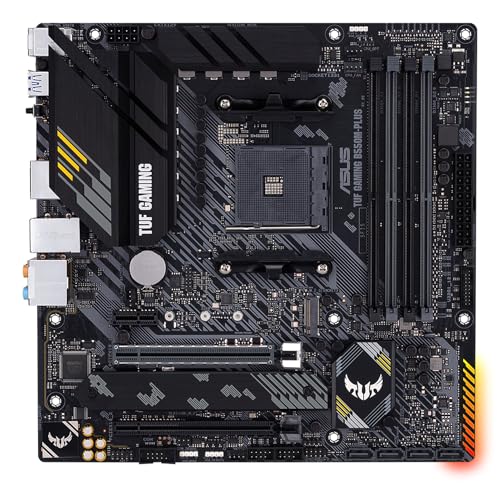 |
Asus TUF Gaming B550M-PLUS | Robust power delivery | 2.5 Gb Ethernet | Aura Sync support | View on Amazon | Read Review |
| Simple Storage Focus |  |
Gigabyte B550M Basic Board | Supports 128GB RAM | Straightforward layout | Ample USB ports | View on Amazon | Read Review |
| Aesthetic Enthusiast Choice |  |
ASRock B550M Steel Legend | Reinforced PCIe slots | Distinctive aesthetic | Thermal protection | View on Amazon | Read Review |
| Connected Office Powerhouse |  |
MSI PRO B550M-P WiFi 6E | WiFi 6E integrated | Bluetooth 5.2 support | Compact mATX size | View on Amazon | Read Review |
More Details on Our Top Picks
-
Gigabyte B550M Gaming X WiFi
This board hits the sweet spot for a typical gaming build. It incorporates WiFi 6 connectivity and a PCIe 4.0 interface, ensuring your network and storage speeds stay relevant. The inclusion of an EZ-Latch mechanism makes physical hardware installation significantly less frustrating.
While it lacks some of the heavy-duty heatsinks found on elite boards, it handles mid-range Ryzen processors with ease. It is a dependable foundation for those who want modern features without paying for unnecessary bells and whistles.
- Brand Name:Gigabyte
- Socket Type:AM4
- Form Factor:Micro-ATX
- Wireless Connectivity:WiFi 6
- PCIe Generation:PCIe 4.0
- Additional Feature:RGB Fusion lighting
- Additional Feature:Two M.2 slots
- Additional Feature:GbE LAN port
-
Gigabyte B550M K Motherboard
If your goal is a functional office or basic home PC, this board provides the necessary components. It strips away the extras to focus on core stability for Ryzen processors. You still gain access to PCIe 4.0 storage, which is a massive win for system responsiveness.
The power delivery is modest, so avoid high-end overclocking. Think of this as the reliable utility truck of the motherboard world. It does the job, gets you to your destination, and ignores the flashy aesthetic trends.
- Brand Name:Gigabyte
- Socket Type:AM4
- Form Factor:Micro-ATX
- PCIe Generation:PCIe 4.0
- Additional Feature:Q-Flash BIOS update
- Additional Feature:USB 3.2 connectivity
- Additional Feature:GbE LAN
-
MSI PRO B550M-VC WiFi
This board is a standout choice for anyone prioritizing wireless speed. By including WiFi 6E and Bluetooth 5.2, it keeps your workstation clutter-free and connected to the latest networking standards. It acts like a digital bridge between your components and high-speed internet.
The layout is clean and logical, which helps when you are routing cables in a tight micro-ATX case. Just ensure your case has decent airflow, as the thermal solutions are functional but not oversized.
- Brand Name:MSI
- Socket Type:AM4
- Form Factor:Micro-ATX
- Wireless Connectivity:WiFi 6E
- PCIe Generation:PCIe 4.0
- Additional Feature:USB 3.2 Gen 2
- Additional Feature:HDMI and DisplayPort
- Additional Feature:SATA 6Gb/s ports
-
Gigabyte B550M Aorus Elite AX
Aorus boards bring an extra layer of refinement to the table. This model adds WiFi 6E capabilities and a more robust aesthetic for users who care about their internal build visuals. The Q-Flash Plus feature is a genuine lifesaver if you ever need to update your BIOS without a CPU installed.
It offers a slightly more aggressive look than the base models. It is built for the user who wants a polished experience without moving up to a larger motherboard form factor.
- Brand Name:Gigabyte
- Socket Type:AM4
- Form Factor:Micro-ATX
- Wireless Connectivity:WiFi 6E
- PCIe Generation:PCIe 4.0
- Additional Feature:Two M.2 slots
- Additional Feature:USB 3.2 ports
- Additional Feature:GbE LAN support
-
MSI PRO B550M-P
This board earns its keep through its memory optimization capabilities. If you plan to push your RAM to higher speeds, the dedicated circuitry here helps maintain stability. It serves as a steady backbone for systems that rely on memory-intensive applications.
The design is strictly business, making it ideal for a professional workstation build. It lacks wireless connectivity, so you should plan to use a wired ethernet connection or add a dedicated expansion card.
- Brand Name:MSI
- Socket Type:AM4
- Form Factor:Micro-ATX
- PCIe Generation:PCIe 4.0
- Additional Feature:Memory Boost tech
- Additional Feature:Gen4 storage support
- Additional Feature:Compact layout
-
Asus Prime B550M-A WiFi II
Asus brings its signature reliability to this mid-range offering. The board includes WiFi 6 support, which ensures you are not tethered to an ethernet cable. It also features ECC memory support, a rare but helpful addition for users who need extra data integrity.
The interface is simple to manage, making it a favorite for those who prefer a straightforward setup. It might not win any beauty contests, but it performs exactly as expected every single time.
- Brand Name:Asus
- Socket Type:AM4
- Form Factor:Micro-ATX
- Wireless Connectivity:WiFi 6
- PCIe Generation:PCIe 4.0
- Additional Feature:Aura Sync RGB
- Additional Feature:PCIe 4.0 slot
- Additional Feature:Compact profile
-
Asus TUF Gaming B550M-PLUS
TUF series boards are designed for longevity and heavy duty operation. With reinforced components and a 10-stage power delivery system, it handles high-performance gaming sessions with impressive thermal management. It functions like a shielded fortress for your processor and memory.
The inclusion of 2.5 Gb Ethernet provides a massive bandwidth advantage for online gaming. This is the right pick if you value long-term durability above all other factors.
- Brand Name:Asus
- Socket Type:AM4
- Form Factor:Micro-ATX
- PCIe Generation:PCIe 4.0
- Additional Feature:Dual M.2 slots
- Additional Feature:USB Type-C support
- Additional Feature:DrMOS power stages
-
Gigabyte B550M Basic Board
Sometimes you just need a board that works without any complications. This Gigabyte model provides a no-nonsense approach, supporting up to 128GB of RAM if you need to run large datasets. It is the definition of a minimalist machine.
Because it lacks advanced wireless features, you will need a wired connection for internet access. It is best suited for a budget-conscious build where you are repurposing older hardware or focusing solely on raw compute power.
- Brand Name:Gigabyte
- Socket Type:AM4
- Form Factor:Micro-ATX
- Memory Slots:4
- Additional Feature:Four SATA ports
- Additional Feature:HDMI video output
- Additional Feature:Four USB 2.0 ports
-
ASRock B550M Steel Legend
The Steel Legend series is known for its distinctive silver styling and reinforced armor. It looks fantastic in a white or light-themed case, making it a popular choice for custom PC builders. Beyond looks, it offers premium build quality that feels substantial in your hands.
The board provides excellent thermal management for your M.2 drives, keeping them cool under load. If you want a motherboard that looks as good as it performs, this is the one to pick.
- Brand Name:ASRock
- Socket Type:AM4
- Form Factor:Micro-ATX
- PCIe Generation:PCIe 4.0
- Additional Feature:Polychrome RGB
- Additional Feature:M.2 heatsink
- Additional Feature:Advanced power design
-
MSI PRO B550M-P WiFi 6E
This is the wireless-ready variant of the PRO series, making it ideal for a modern home office. You gain the latest WiFi 6E and Bluetooth 5.2 standards, ensuring your peripherals and network remain fast. It is a workplace warrior that handles day-to-day multitasking effortlessly.
The PCIe 4.0 support ensures that your storage drive stays current for years. It is an efficient, quiet, and reliable choice for anyone who demands consistent performance in a compact space.
- Brand Name:MSI
- Socket Type:AM4
- Form Factor:Micro-ATX
- Wireless Connectivity:WiFi 6E
- PCIe Generation:PCIe 4.0
- Additional Feature:USB 3.2 Gen 2
- Additional Feature:HDMI and DP
- Additional Feature:SATA 6Gb/s support
Frequently Asked Questions
Can I use a Ryzen 5000 series processor right out of the box?
Most B550 boards are compatible with the Ryzen 5000 series without needing an update. However, some older stock might still have an outdated BIOS. Look for a board with a BIOS Flashback button. This allows you to update the firmware using only a USB thumb drive, even if the CPU isn't recognized yet.
Is it worth paying more for built-in Wi-Fi?
Buying a board with integrated Wi-Fi is usually cheaper than purchasing a separate PCIe network card later. It also saves you a valuable expansion slot. If your router is in another room, prioritize a board that supports Wi-Fi 6 or 6E. This ensures a faster and more stable connection for gaming and large downloads.
Do I need a specific case for a Micro-ATX motherboard?
You need a case that lists mATX support in its specifications. While these boards can often fit into larger ATX cases, they will look quite small inside. A dedicated Micro-ATX case is a better choice if you want a compact footprint. It reduces wasted space and keeps your desk area looking tidy.
Will a B550 board support my older Ryzen CPU?
B550 boards typically support Ryzen 3000 series processors. Many also support 4000 series chips, but compatibility with older 1000 or 2000 series models is often limited or non-existent. Always check the manufacturer's website for the specific CPU support list before you commit to a purchase. It is a quick step that saves you from a major headache later.
Does the motherboard affect my gaming frame rates?
The motherboard itself does not directly increase your FPS. It acts as the foundation that allows your CPU, GPU, and RAM to communicate efficiently. A high-quality board ensures your components run at their rated speeds without crashing or overheating. It provides the stability required to maintain consistent performance during long gaming sessions.


