
Why settle for thin, inaccurate sound when you could hear your mix exactly as it is? A decent pair of speakers acts like a magnifying glass for your audio.
You want clarity, not just volume. Finding the Best Cheap Studio Monitors means identifying gear that provides a flat response without demanding a massive investment. Let’s evaluate the top contenders.
Key Takeaways
- Prioritize monitors with balanced TRS inputs to prevent unwanted electrical interference and humming in your signal chain.
- Choose a woofer size that matches your desk space, as 3.5-inch drivers keep a small footprint while 5-inch units offer better bass extension.
- Seek out models that include dedicated high and low frequency controls so you can tune the speakers to your specific room acoustics.
- Ignore marketing claims about built-in Bluetooth for critical mixing tasks, as wireless compression often hides subtle details in your audio.
- Ensure the speakers are physically active or powered to avoid the extra expense and clutter of an external amplifier.
| Best Overall Value |  |
KRK Kreate 3 Powered Monitors | Accurate frequency response | Compact desk footprint | Reliable monitoring performance | View on Amazon | Read Review |
| Top Desktop Staple |  |
PreSonus Eris 3.5 Active Monitors | Tight, punchy sound | High-quality silk-dome tweeter | Great for vocal editing | View on Amazon | Read Review |
| Best Wireless Connectivity |  |
Ortizan C7 Dual-Mode Monitors | Seamless Bluetooth 5.3 | Dual-mode versatility | Easy setup process | View on Amazon | Read Review |
| High Fidelity Choice |  |
Edifier MR3 Hi-Res Monitors | Hi-Res Audio certified | Modern Bluetooth 5.4 | Convenient headphone output | View on Amazon | Read Review |
| Intuitive Control Center |  |
Mackie CR3.5 Creative Monitors | Intuitive tone control | User-friendly placement switch | Sleek industrial design | View on Amazon | Read Review |
| Reliable Professional Reference |  |
Yamaha HS4 Powered Monitors | Honest, flat response | Professional build quality | Consistent audio performance | View on Amazon | Read Review |
| Best Dual-Purpose Mode |  |
Edifier MR4 Monitor Speakers | Switchable monitoring modes | 4-inch woofer depth | Multiple input choices | View on Amazon | Read Review |
| Expanded Bass Response | 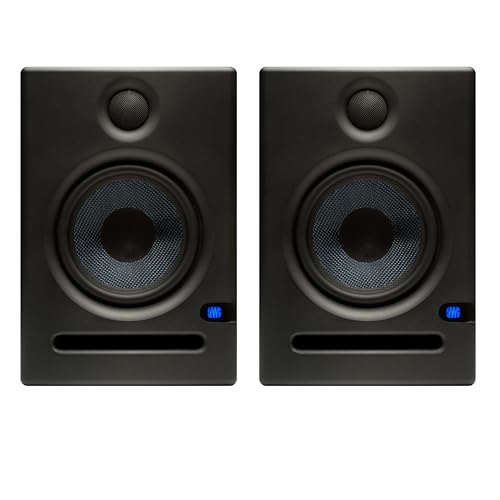 |
PreSonus Eris E5 Monitors | Deeper bass extension | Wider sweet spot | Solid build quality | View on Amazon | Read Review |
| Advanced Waveguide Imaging |  |
PreSonus Eris E7 XT Monitor | Wide EBM waveguide | Superior imaging | Professional-grade performance | View on Amazon | Read Review |
| Feature-Packed Performance |  |
Rockville ASM4 Powered Monitors | Massive input variety | High power output | Built-in DSP tuning | View on Amazon | Read Review |
More Details on Our Top Picks
-
KRK Kreate 3 Powered Monitors
These monitors provide a balanced frequency response that is rare at this tier. They serve as an ideal entry point for home producers who need to hear their mix clearly without a massive desk footprint. Think of them as a reliable reference tool that keeps your project on the right track.
You might find the low-end performance falls short if you work in bass-heavy genres like hip-hop or EDM. They are compact and efficient for small bedroom studios where space is at a premium.
- Brand Name:KRK
- Speaker Count:Pair
- Additional Feature:Powered active design
- Additional Feature:Small room optimization
- Additional Feature:Clear audio imaging
-
PreSonus Eris 3.5 Active Monitors
The Eris 3.5 is the industry standard for budget-conscious creators. Its woven-composite woofer manages to keep audio tight and punchy, which is exactly what you need when editing vocals or dialogue.
While they are excellent for general production, they lack the raw power required for larger listening rooms. These speakers act like a surgical tool for your desktop, revealing flaws in your mix that standard computer speakers would hide.
- Brand Name:PreSonus
- Driver Size:3.5 inches
- Power Output:50 Watts
- Speaker Count:Pair
- Additional Feature:Near field design
- Additional Feature:Active internal amplification
- Additional Feature:Woven-composite woofer
-
Ortizan C7 Dual-Mode Monitors
If you want to switch between professional work and casual listening, these speakers offer the flexibility of Bluetooth 5.3. They act as a Swiss Army knife for your audio setup, handling both wired production tasks and wireless streaming effortlessly.
Be aware that they are not purely analytical monitors, so they might color the sound slightly more than pro-grade gear. They are the perfect hybrid choice for someone who shares their workspace between gaming and music creation.
- Brand Name:Ortizan
- Connectivity Type:Bluetooth and Wired
- Speaker Count:Pair
- Additional Feature:Active monitor design
- Additional Feature:Near field optimization
- Additional Feature:Wireless computer playback
-
Edifier MR3 Hi-Res Monitors
These speakers bring Hi-Res Audio certification to the budget category. They provide a surprisingly detailed soundstage, acting like a clear window into your music that lets you pick out subtle nuances in your recordings.
The inclusion of a headphone output is a thoughtful touch for late-night editing sessions. Just keep in mind that the rear controls are a bit fiddly to reach if you have them pushed against a wall.
- Brand Name:Edifier
- Connectivity Type:Bluetooth, TRS, RCA, AUX
- Speaker Count:Pair
- Additional Feature:Balanced input support
- Additional Feature:Active bookshelf design
- Additional Feature:High-resolution audio playback
-
Mackie CR3.5 Creative Monitors
Mackie designed these for the creative professional who wants quick adjustments without digging through software menus. The dedicated tone knob allows you to sculpt your sound on the fly, making them feel like a natural extension of your creative flow.
They are quite lightweight, which can lead to minor cabinet resonance at higher volumes. Despite this, their compact form factor makes them a smart pick for tight workspaces.
- Brand Name:Mackie
- Driver Size:3.5 inches
- Speaker Count:Pair
- Additional Feature:Active power amplification
- Additional Feature:Creative reference tuning
- Additional Feature:Desktop-friendly size
-
Yamaha HS4 Powered Monitors
Yamaha is synonymous with analytical sound, and the HS4 brings that heritage to a smaller, more affordable frame. These speakers act like a truth serum for your mix, exposing any imbalances in your frequency range.
Because they are tuned for honesty, they can sound a bit thin if you are used to boosted consumer speakers. If you are serious about learning to mix, these are an essential investment.
- Brand Name:Yamaha
- Speaker Count:Pair
- Additional Feature:Powered active circuitry
- Additional Feature:Precision monitor tuning
- Additional Feature:Compact studio footprint
-
Edifier MR4 Monitor Speakers
The MR4 is a versatile performer that includes dedicated monitoring and music modes. You can easily switch between a flat response for mixing and an enhanced mode for gaming or watching media.
The white finish is distinct, though it might show dust faster than standard black models. They are a steady workhorse that handles everything from casual listening to entry-level tracking.
- Brand Name:Edifier
- Driver Size:4 inches
- Input Options:Balanced TRS, RCA, AUX
- Power Output:42 Watts
- Speaker Count:Pair
- Additional Feature:1-inch silk dome tweeter
- Additional Feature:Dual-mode DSP tuning
- Additional Feature:Near field optimized
-
PreSonus Eris E5 Monitors
Moving up to a 5.25-inch woofer makes a world of difference in low-end clarity. These monitors provide a fuller soundstage, making them better suited for genres where bass presence is critical to the mix.
They require more desk space than smaller 3-inch models, so ensure your setup can accommodate them. Think of these as the grown-up version of your average starter monitors.
- Brand Name:PreSonus
- Driver Size:5.25 inches
- Speaker Count:Pair
- Additional Feature:2-way active design
- Additional Feature:Near field monitoring
- Additional Feature:Acoustic tuning controls
-
PreSonus Eris E7 XT Monitor
The EBM waveguide in this model creates a wider sweet spot, which is incredibly helpful when you are moving around your studio. It acts like a focused spotlight, ensuring you hear the same accurate audio regardless of your exact seating position.
Note that this is sold as a single unit, so you need to buy two for a stereo setup. It is a serious upgrade for anyone who has mastered the basics and wants a more precise listening experience.
- Brand Name:PreSonus
- Speaker Count:Single unit
- Additional Feature:Active monitoring system
- Additional Feature:Advanced acoustic tuning
- Additional Feature:Near field accuracy
-
Rockville ASM4 Powered Monitors
Rockville packs more input options into these than almost any other monitor on this list. With optical, Bluetooth, and standard inputs, they are the ultimate connectivity hub for a multi-device desktop setup.
The sheer number of features means the internal DSP is doing a lot of work, which may not satisfy those who prefer a purely analog path. However, they are incredibly convenient for those running both a computer and a console on the same desk.
- Brand Name:Rockville
- Driver Size:4 inches
- Input Options:Optical, TRS, RCA, 3.5mm
- Power Output:200 Watts peak
- Connectivity Type:Bluetooth 5.0
- Speaker Count:Pair
- Additional Feature:Silk dome tweeter
- Additional Feature:Integrated bass port
- Additional Feature:Class D amplification
Frequently Asked Questions
Do I need a subwoofer for my home studio?
Most users do not need one. A quality pair of 5-inch monitors produces enough low end for standard mixing tasks. Adding a subwoofer often complicates your room acoustics and introduces phase issues that are difficult to fix.
Can I use standard bookshelf speakers instead?
You could, but they are built for enjoyment rather than accuracy. Bookshelf speakers often scoop the mids or boost the treble to make music sound exciting. Studio monitors provide a neutral reference so you can make informed decisions about your mix.
How far apart should I place my monitors?
Create an equilateral triangle between the two speakers and your head. Aim for 60 degrees of separation to achieve a balanced stereo image. Adjust the angle until the sweet spot feels centered and stable.
Do I need an audio interface to use these?
Yes, you should use one to ensure the best signal quality. Connecting monitors directly to a computer headphone jack often introduces background noise and hiss. An interface converts digital audio into a clean analog signal for your speakers.
Are these monitors safe to leave on all day?
Modern studio monitors are designed for long sessions. They include thermal protection and energy-efficient components to prevent overheating. Just ensure they have a few inches of space for proper ventilation around the back panels.